Adding Flavor To Windows 7: Advices, Tweaks, Cures, Hints and more...
Learn How To Assign Hot-keys And Start Your Programs By Touching A Key In Windows 7
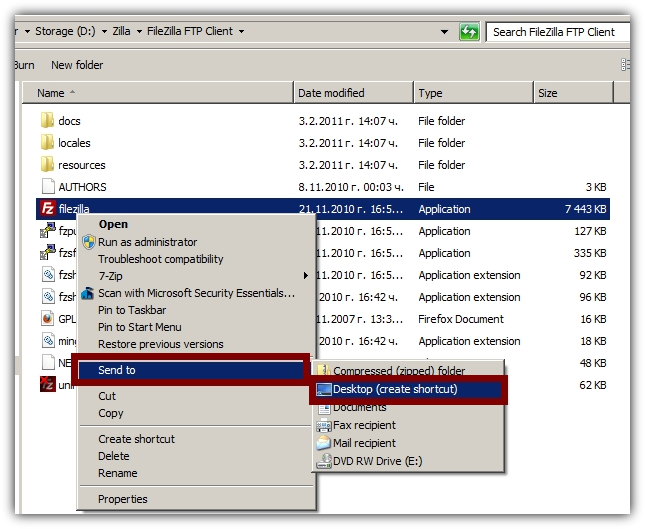
Step 1: Create a shortcut of the application you would like to start by a hot-key combination.
In my case I will create a shortcut of my FTP client - File Zilla. In order to create a shortcut just right click on the exe file of your program and go to Send To > Desktop (create shortcut)
Step 2: Insert a hot-key combination
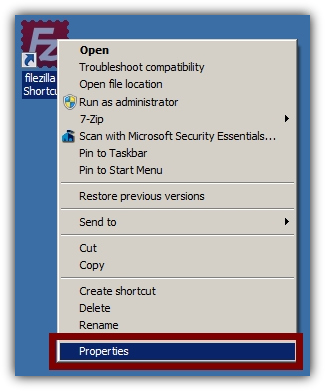
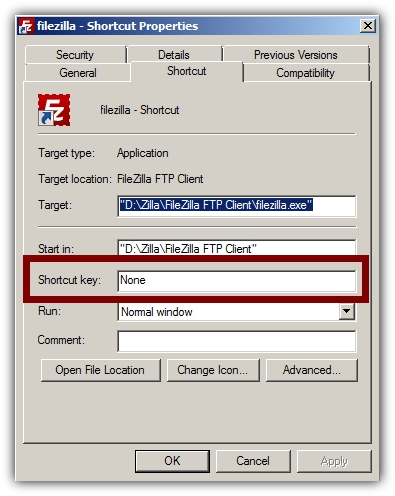
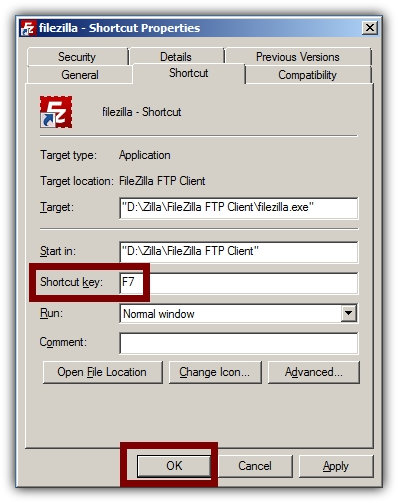
Right-click on the new shortcut and choose Properties. Insert a combination.
You can use various combinations such as CTRL+ALT+ Letter but the fastest and the most convenient way is to use one of the function buttons - F2 to F12. Don't use F1 because it will cause problems since the majority of the software uses F1 as a hot-key to the help section.
Note: Other F keys might cause similar problems but it won't happen as often.
This is it. You can now start your favorite applications in seconds. If you have any question please submit a comment. Also make sure to stop by for more Windows hints and tips.
You might also like...