Related articles:
Mozilla Firefox 101: Cool Tips and Tricks
Useful Tricks In Mozilla Firefox
Mozilla Firefox is the most popular web-browser today and for a good reason. It's awesome. Here is a list of the most useful tricks and tips that will make your experience with the program even better.
1. Speed Up Firefox
This is probably the oldest trick in the book.
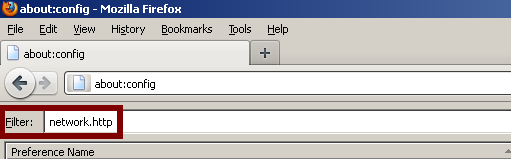
Type "about config" into the address bar and hit Enter.
Type "network.http" into the Filter bar
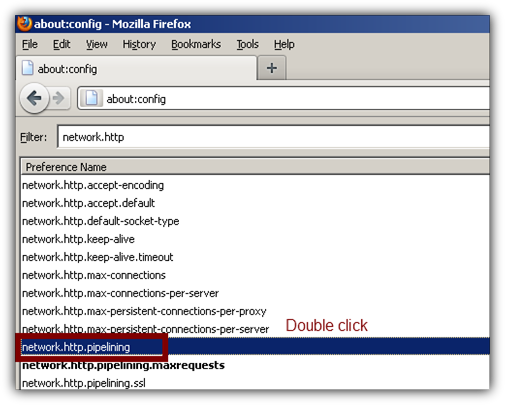
Change “network.http.pipelining” to “true” by double clicking on it with the left mouse button.
Change “network.http.proxy.pipelining” to “true” by double clicking on it with the left mouse button.
Change “network.http.pipelining.maxrequests” to 30 in order to make 30 requests at once.
Create new integer: Right-click anywhere and choose New > Integer.
Name the new Integer “nglayout.initialpaint.delay” and set its value to 0 (zero). This will be the time Mozilla Firefox waits before getting to work after receiving information.
2. View the page source of any web-page in external code editor such as Notepad ++.
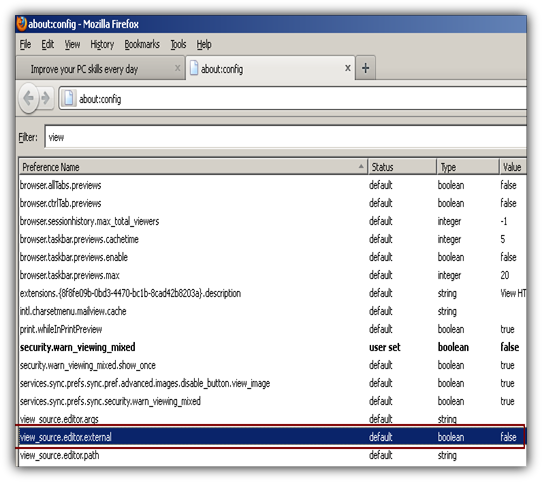
Write "about:config" in the address bar again and set view_source.editor.external to true.
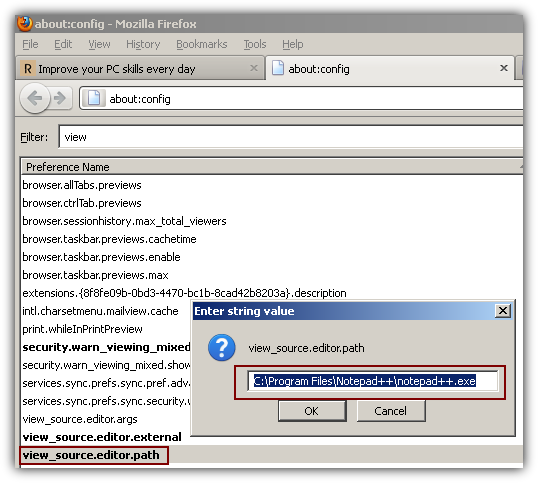
Enter the path of your preffered editor by double-clicking on view_source.editor.path
3. Mouse shortcuts in Mozilla Firefox
|
Action |
Function |
|
Middle click on link |
Opens in new tab |
|
Shift + Scroll down |
Go to previous page |
|
Shift + Scroll up |
Go to next page |
|
Ctrl+ Scroll up |
Zoom in |
|
Ctrl + Scroll down |
Zoom out |
|
Middle click on tab |
Closes tab |
4. Cool Mozilla Firefox add-ons
If you are sick of the countless ads on most sites this is the plugin for you.
Download any video from Youtube and other online movie storage databases.
Block all annoying Flash offers and improve the speed of your browser.
Check your e-mail in seconds with WebMail Notifier.
This Add-on will automatically install some of the most popular add-ons ever...
5. Cool hotkeys in Mozilla Firefox
|
Hotkeys |
Function |
|
|
|
|
Ctrl+C |
Copy |
|
Ctrl+V |
Paste |
|
Ctrl+X |
Cut |
|
Ctrl+W |
Close Window |
|
Ctrl+Del |
Delete Next Word |
|
Page Up |
Go Up One Page |
|
Page Down |
Go Down One Page |
|
Up Arrow |
Go Up One Line |
|
Down Arrow |
Go Down One Line |
|
Ctrl+Z |
Undo |
|
Ctrl+Shift+Z |
Redo |
|
Ctrl+F |
Find |
|
Ctrl+G or F3 |
Find Again |
|
Ctrl+Shift+F |
Open search engine page |
|
Home |
Move to beginning of line (in a text editing field) |
|
End |
Move to end of line (in a text editing field) |
|
Ctrl+Q |
Exit Mozilla |
|
Ctrl+1 |
Start Navigator |
|
Ctrl+2 |
Start Mail & Newsgroups |
|
Ctrl+3 |
Open Middle Tab |
|
Ctrl+4 |
Start Composer |
|
Ctrl+5 |
Start Address Book |
|
Ctrl+6 |
Start IRC Chat |
|
Ctrl+H |
Open History Window |
|
Reload |
Ctrl+R |
|
Force Reload (not from cache) |
Ctrl+Shift+R |
|
Back |
Alt+Left Arrow or Backspace |
|
Forward |
Alt+Right Arrow |
|
Stop |
Esc |
|
Home |
Alt+Home |
|
Go to Bottom of Page |
End |
|
Go to Top of Page |
Home |
|
Select All Text in Location Bar |
Ctrl+L or Alt+D |
|
Open Web Page Location |
Ctrl+Shift+L |
|
Open Selected Link in a Web Page |
Enter |
|
Move to Next Frame (in web pages using frames) |
F6 |
|
Move to Previous Frame (in web pages using frames) |
Shift+F6 |
|
New Navigator Window |
Ctrl+N |
Visit this page in order to view the complete list of hotkeys.